RECORDING AND EDITING / Audacity
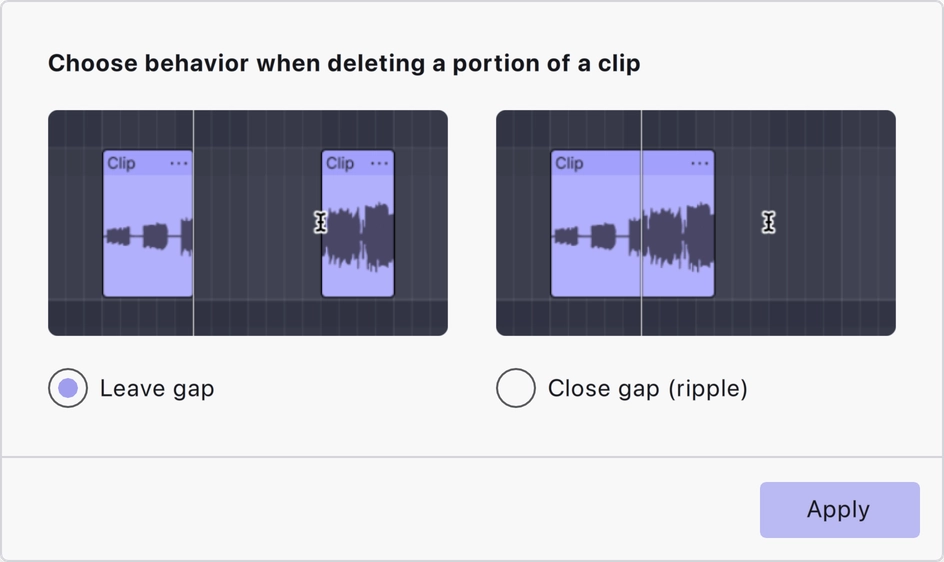
Removing unwanted speech can either preserve the timeline or pull later audio earlier. The correct choice depends on whether other material must stay synchronised.
Ask what depends on the timing
A solo voice recording can often become shorter after a mistake is removed. A voice track aligned to a video, music cue or second speaker may need its later timing preserved. Before deleting, identify which other elements depend on the current position. This prevents a small clean-up from quietly moving an important phrase away from its intended moment.
Understand the documented choices
Audacity's current guide describes deletion behaviours that leave a gap or close it through ripple editing. The names express different outcomes, not different levels of quality. Practise both on a copy and listen to what follows the edit. Version-specific controls may differ, so use the guide for your installed release rather than assuming an older screenshot shows the same interface.
Listen across the join
Closing a gap can join two sounds that were never meant to touch. Keep enough room for a breath or a change of thought. Leaving a gap can preserve sync but create a conspicuous interruption in a standalone talk. In either case, review a few seconds before and after the edit. The waveform can help you locate a boundary, but it cannot judge conversational rhythm for you.
Check more than the edited track
After changing timing, inspect any related tracks and a later reference point in the project. A problem may become noticeable well after the cut. Save a new version before a major restructuring pass and export a representative section. Clear editing decisions are easier to revise than a long sequence of unexplained deletions.
A small check to try
- Identify tracks that must stay synchronised.
- Try both deletion behaviours on a copy.
- Check a later timing reference after editing.